Write
a Glossary of the following key technical terms and subjects:
Pixel
A pixel is the fundamental building block of images in digital software. It is the smallest point of the image that can select different colours to build coloured designs. The name: Pixel comes from the words "picture element" with good reason that the pixel is the smallest possible block of an image. For example:

In this picture, the colours shown are displayed by each pixel selecting a colour. The colours available depend on the "colour depth" this, depth tells us how many colours are available to each pixel and the amount of bits per pixel. So, an 8 bit colour depth would have the choice of 256 colours because:
1x2 = 2, 2x2 = 4, 2x4 = 8, 2x8= 16, 2x16 =32, 2x32 = 64, 2x64 = 128, 2x256 or 2^8 = 256.
Therefore, 24-bit would be 2^24 = 16,777,216
The reason it has 256 colours is because the end number for example 2 (1 bit colour the most basic) has been doubled 8 times. The bits in a pixel have the value of 0, or 1, therefore the more bits their are, the higher difference in colour.
Colour
Models – RGB and CMYK
The colour models RGB and CMYK are used in the computer design industry to create colours, based from afew standard colours.
RGB
The RGB model is used in monitors, mobile phones, Television and any other digital light source. The RGB stands for Red, green and blue and manipulates these colours to produce another colour. They use values between 0-255 to produce a total of 256 possible combinations of 1 colour. Multiply that by the 3 colours and you get 16,777,216 combinations of colours specific to each of the variations of red, green and blue. When all of the combinations of colours are at 255, they create white, meaning all of the colours are being projected at once at the highest outcome. When the colour combinations are at 0, the colour would be black, meaning no colours are being projected from the black monitor so it would stay black.

http://upload.wikimedia.org/wikipedia/commons/thumb/c/c2/AdditiveColor.svg/1024px-AdditiveColor.svg.png
CMYK
The CMYK model is used during printing. The CMYK stands for Cyan, magenta, yellow and black (or key). It can be changed to produce a black image in printing onto white paper. The CMYK model uses percentages instead of values, and is out of 100%. So 0/0/0/100 would be just black, where as 100/0/0/0 would be cyan. When all the values are 0 percent the colour of paper would appear white because no ink would be projected onto the page.

Resolution
 : file formats and uses - psd, bmp, gif, tiff, jpg, png
Resolution is the gap between lines that make it appear visibly correct. So if you have two lines at a smaller gap, it would be a finer resolution as long as the eyes can still make out what the image is. Resolution can be measured in pixels per inch, so the more pixels you have in a given space, the finer the image would look because it is more visibly accepted by the eye. For instance; the image below appears easier on the eye on the far right compared to the third image on the left where the "R" can hardly be resembled. When taking into account resolution, sure the number may be bigger but it doesn't mean that the quality will be better. When watching the television, let's say the resolution is 1920x1080, this resolution means that 1920x1080 = 2,073,600 pixels on the screen in a given area. But if the screen where bigger, let's say a cinema screen, you would see a less clear image because the screen is bigger yet it only has the same number of pixels as the TV being projected, so the TV would be better quality and appear better on the eye.
Raster
Images
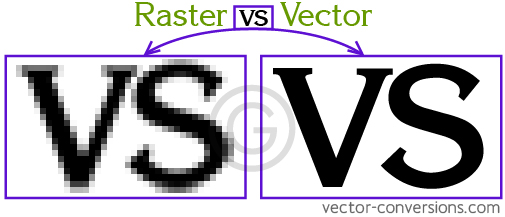
Raster images are pixel based images that are commonly found in the file types: -psd, bmp, gif, tiff, jpg, png. Infact pictures are a type of raster image. When scaled in, or zoomed in, a raster image appears pixelated and has a staircase effect. The pixels become larger as the size of each pixel stays consistant. Raster images have a larger file size than vector images, however are much more common. These images are more suitable for photographs too this is because pixels can create a better fading/mixing of colours.
Raster images are pixel based images that are commonly found in the file types: -psd, bmp, gif, tiff, jpg, png. Infact pictures are a type of raster image. When scaled in, or zoomed in, a raster image appears pixelated and has a staircase effect. The pixels become larger as the size of each pixel stays consistant. Raster images have a larger file size than vector images, however are much more common. These images are more suitable for photographs too this is because pixels can create a better fading/mixing of colours.

http://vector-conversions.com/images/raster_vs_vector.jpg
Vector Images
Vector images are different to raster images. Vector images use mathematical equations instead of pixels to ensure a smooth cut image is created when it is enhanced, for example the image above has been zoomed in for both raster and vector variations of the same text, but the vector appears smoother than the raster image because of the line based image. Vector images also take up a smaller file size than raster images, however are much rarer than raster images. Vector images have a disadvantage however, they are not as good at fading colours where as raster images are.
Cross Platform Images
A pdf (portable document format) captures formatting information from other desktop publishing applications such as publisher and microsoft word. This is the process of hopefully letting another persons' monitor show the infomation you're trying to display this is useful in gaming depending on the type of computer the player has. This is why graphics settings are sometimes put into place.
Compression
Compression is the process that lowers the file size of an image. There are two types of compression lossy and lossless, however these both work in very different ways.
Lossy
Lossy compresison is a type of compression, in which a file will reduce it's file size tremendously. However the quality of the image will depreciate and be lost over time. For example, when a file is lossy compressed, pixels will often borrow colour from each of the surrounding pixels because it is easier to use less amount of color fading etc. So the pixels will appear larger and "pixelate".
 http://www.agilegeoscience.com/storage/post-images/JPEG_compression_demo_small.png
Lossless
Lossless compression is much different than lossy, it reduces the file to a much larger file size. Lossless compression is also better if a person wants to keep the quality of an image, such that printing requires the quality and sometimes in e-mails where mass amounts of images could go over the file size limit. Lossless compression however does not allow the image to be compressed as much, often compressing the images to -15% to -40.
Image captures devices
Image capture devices such as lenses, digital cameras, tablets and smartphones, all use a similiar type of image processing. This works such that the object in focus is inverted by the lens onto the device, then it will process the image and display it however it would, whether it's on a monitor, or straight away prints out the image for the person to view. Modern image capture devices such as digital cameras fire electrons from matter depending upon the light wavelength that enters the camera, therefore projecting the image more accurately depending upon the sensor.

A pdf (portable document format) captures formatting information from other desktop publishing applications such as publisher and microsoft word. This is the process of hopefully letting another persons' monitor show the infomation you're trying to display this is useful in gaming depending on the type of computer the player has. This is why graphics settings are sometimes put into place.
Compression
Compression is the process that lowers the file size of an image. There are two types of compression lossy and lossless, however these both work in very different ways.
Lossy
Lossy compresison is a type of compression, in which a file will reduce it's file size tremendously. However the quality of the image will depreciate and be lost over time. For example, when a file is lossy compressed, pixels will often borrow colour from each of the surrounding pixels because it is easier to use less amount of color fading etc. So the pixels will appear larger and "pixelate".
Lossless
Lossless compression is much different than lossy, it reduces the file to a much larger file size. Lossless compression is also better if a person wants to keep the quality of an image, such that printing requires the quality and sometimes in e-mails where mass amounts of images could go over the file size limit. Lossless compression however does not allow the image to be compressed as much, often compressing the images to -15% to -40.
Image captures devices
Image capture devices such as lenses, digital cameras, tablets and smartphones, all use a similiar type of image processing. This works such that the object in focus is inverted by the lens onto the device, then it will process the image and display it however it would, whether it's on a monitor, or straight away prints out the image for the person to view. Modern image capture devices such as digital cameras fire electrons from matter depending upon the light wavelength that enters the camera, therefore projecting the image more accurately depending upon the sensor.
Optimising
Optimising a file is to get the most of a file. This is done, for instance, by having a pdf image over 5mb. It could be printed out in fine detail and pixel perfect. But for website uploading, the file should not be so big. This is because it would be faster to download this file and easier for a friend or other people to download.
Optimising a file is to get the most of a file. This is done, for instance, by having a pdf image over 5mb. It could be printed out in fine detail and pixel perfect. But for website uploading, the file should not be so big. This is because it would be faster to download this file and easier for a friend or other people to download.
Storage and Asset management
Storage management is taking care of assets, such as virus scanning, and keeping archives or backups in either cloud or any other external piece of hardware such as a USB stick or an external hard-drive. Storage and asset management is a great way to ensure a file will not become lost or corrupt when transferring or tampering.
Storage management is taking care of assets, such as virus scanning, and keeping archives or backups in either cloud or any other external piece of hardware such as a USB stick or an external hard-drive. Storage and asset management is a great way to ensure a file will not become lost or corrupt when transferring or tampering.
Illustrate as required and
remember to cite any sources you have used in your research, both written and
visual.



No comments:
Post a Comment